01 / ORIENT
Learn what models do
Start with language models and transformers. Learn tokens, prompts, context windows, and why a fluent answer can still be wrong.
Understand the basics, get useful work from AI tools, set up a model or assistant, then explore the research questions behind them. Follow the short path—or jump straight to the topic you need.
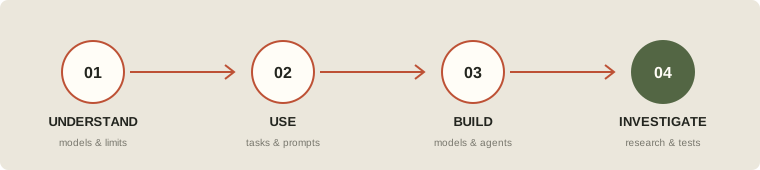
Start with language models and transformers. Learn tokens, prompts, context windows, and why a fluent answer can still be wrong.
Give a clear goal, relevant context, constraints, and an output format. Check important claims against sources; iterate when the first answer misses.
Try a local model or a server-side API. Add tools only for a defined task, keep credentials private, and request approval before consequential actions.
Read an abstract, identify the method and evaluation, then ask what comparison, dataset, or limitation could change the conclusion.
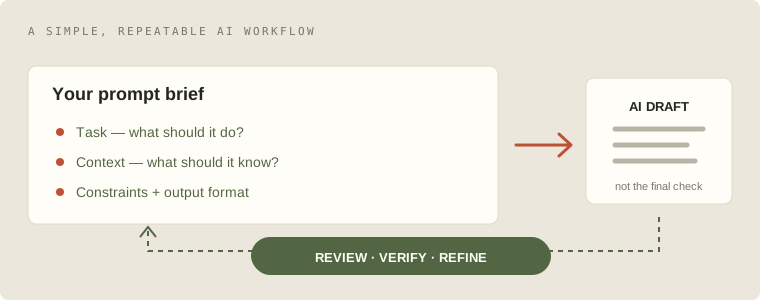
State the task, audience, source material, constraints, and desired format. For factual work, ask it to cite sources and say when it cannot verify a claim.
Open prompt-engineering guide ↗Ask for a first pass, inspect the reasoning and evidence, correct errors, then use a second pass to check coverage. Keep human judgment for high-stakes decisions.
Explore Stanford’s AI Index ↗Models can be confidently wrong, miss fresh events, or reflect gaps and bias in their data. Verify dates, quotations, numbers, and advice independently.
Study model capabilities & limits ↗Ollama offers a straightforward path to try a local model. Install it, choose a model that fits available hardware, then test with a simple prompt. Model downloads and memory needs vary.
Ollama quickstart ↗Create an API key only if you choose a hosted service. Load it from a server-side environment variable or secret manager—never embed a live secret in browser code or a public repository.
OpenAI API quickstart ↗An agent combines a model, instructions, tools, and a run loop. Begin with one narrow task and limited tools; add review, logs, and approval gates before expanding its permissions.
Build a first agent ↗Local inference gives you control over where the model runs, but needs disk, memory, and compatible hardware. Hosted APIs shift compute to a provider and require careful credential and data handling.
Give an assistant only the tools and data it needs. Test in a safe workspace; require human confirmation before sending messages, publishing, spending, or deleting.
How can attention layers represent relationships across a sequence? Read the original Transformer paper, then trace how later language models build on the architecture.
Vaswani et al., “Attention Is All You Need” ↗How should a model retrieve external documents and use them in an answer? Study retrieval quality, citation faithfulness, freshness, and what happens when the evidence is irrelevant.
Lewis et al., RAG for knowledge-intensive NLP ↗Use a survey to build vocabulary around retrieval, augmentation, training, applications, and open problems before diving into a narrower paper.
Read a comprehensive RAG survey ↗Study planning, tool choice, handoffs, memory, observability, and evaluation. Ask whether a multi-step agent is actually better than a simpler workflow.
Hugging Face Agents Course ↗Build representative test cases before tuning. Track correctness, groundedness, latency, cost, and failure modes; re-test after changing prompts, models, or tools.
Model optimization & evals ↗Follow a structured course to load models, work with tokenizers and datasets, fine-tune responsibly, and share demos.
Hugging Face LLM Course ↗Choose the safest default for a website that calls a hosted AI service.